ActionSky End-to-end Migration Solution: SQL Server to OceanBase
 Oct 10, 2025
1. Why Autonomous and Controllable Technology Matters for Public Hospitals
Imagine the consequences if sensitive hospital data such as patient information, medical records, and research data were leaked: risks would extend from individuals to national public health security. Secure healthcare digitalization is a key part of China’s Digital China “2+8” framework and is directly tied to both national strategic security and public safety.
Promoting localization helps public hospitals reduce dependence on foreign technologies and lower systemic risk. Through localization replacement, hospitals can build autonomous and controllable technology stacks, strengthen security governance for new technologies, and ensure data safety in transmission, storage, and usage.
2. Database Migration Selection for a Top-tier Hospital
A major hospital management system project at a top-tier domestic hospital was initiated by a key municipal institution. Under strict autonomy and controllability requirements, the project faced tight timelines, heavy workloads, and high compliance standards (including cryptographic and graded protection assessments). Because the database is the core infrastructure carrying all hospital data, technology selection became critical to project success.
The hospital’s existing system was based on SQL Server and required replacement. After in-depth evaluation of multiple domestic database options, OceanBase was selected as the target platform. ActionSky provided a dedicated end-to-end migration solution from SQL Server to OceanBase.
3. Major Challenges in Public Hospital Data Migration
This migration involved 6 SQL Server instances, each containing 100+ tables, with over 300 million total rows, plus more than 30 stored procedures. Key anticipated challenges included:
1) High Risk of Business Interruption
- Long downtime windows: without efficient incremental synchronization, ensuring consistency could require downtime from hours to even tens of hours. This is unacceptable for a 24x7 hospital system and would directly impact registration, diagnosis, treatment, and report queries.
- Severe consequences of inconsistency: manual schema comparison, conversion, and scripting are error-prone. Small mistakes (for example incompatible field types, missing defaults, absent indexes) can lead to incomplete data or logic errors in the target system. In healthcare scenarios, even minor deviations in medication records or test results can trigger serious safety incidents.
- Difficult rollback: when issues appear during migration, rolling back to the legacy system is extremely time-consuming and uncertain due to data volume and business complexity, amplifying interruption impact.
2) High Stability and Latency Pressure
- Hard-to-predict performance bottlenecks: manually written migration scripts often lack performance tuning. When processing TB-scale historical data, throughput can be much lower than expected, and resource contention may degrade source (SQL Server) or target (OceanBase) performance, affecting parallel business operations during migration.
- Lack of real-time synchronization: low-latency requirements mean near-real-time sync from SQL Server to OceanBase is needed to minimize cutover downtime. Manual approaches cannot achieve this target.
3) High Labor and Time Costs
- Repetitive and inefficient work: with a large number of database objects, manual analysis, conversion, and verification are highly tedious and time-consuming, delaying overall project progress.
- High expertise requirements: implementers must understand both SQL Server and OceanBase in depth. Such talent is scarce, which further tightens resources.
4) Resource Bottleneck and High Risk in Stored Procedure Refactoring
- Stored procedure conversion is expensive: conversion of non-table objects such as stored procedures is often still manual, requiring substantial effort.
4. End-to-end Data Migration Solution
Software versions used in this migration:
- Microsoft SQL Server 2016
- OceanBase V4.2.5 Enterprise Edition (MySQL mode)
- Action OMS 4.25.09.0
The migration process included the following parts:
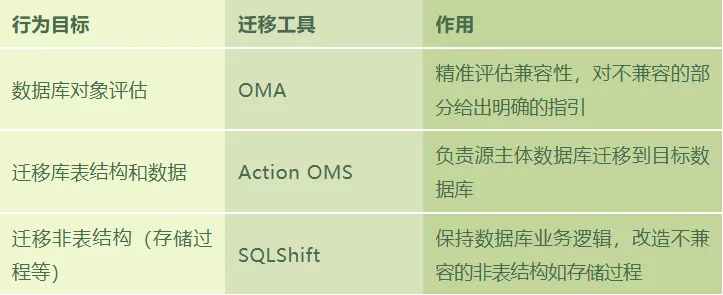 Based on the hospital’s database characteristics, ActionSky provided a full Action OMS + SQLShift migration solution.
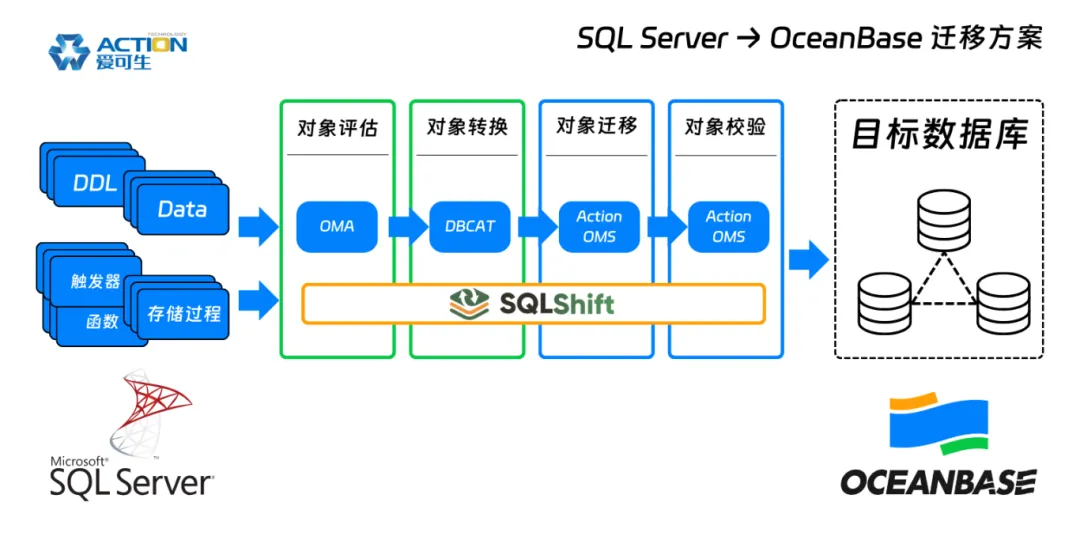
Role of Action OMS in the Solution
- Data consistency assurance: Action OMS provides consistency controls throughout migration and transmission, reducing data-loss risk during database conversion.
- Seamless application cutover: with full sync, incremental sync, and consistency validation, Action OMS shortens synchronization time and reduces cutover windows.
- SQL Server CDC tool replacement: Action OMS enables smooth replacement of existing CDC tooling, reducing costs while ensuring stability and accuracy of upstream/downstream incremental synchronization.
Role of SQLShift in the Solution
- Near-zero-error delivery: SQLShift addresses complex-object migration risks such as implicit type conversion and business logic omissions, improving consistency and lowering production incident risk.
- Faster migration validation and cutover: by accelerating non-table object assessment, conversion, migration, and consistency checks, SQLShift shortens synchronization time and cutover windows.
5. Advantages of the Migration Solution
- Strong fit for business scenarios: this hospital management system is mission-critical and requires stable, efficient synchronization from heterogeneous upstream databases such as SQL Server and DB2. OceanBase provides high performance and high availability; combined with Action OMS, it replaces legacy SQL Server CDC tools and enables integrated “database + synchronization tooling” delivery.
- Advanced and scalable architecture: current data volume is around 2-3 TB and is expected to grow to 5-10 TB. OceanBase’s native distributed architecture supports strong horizontal scalability and smooth growth, protecting long-term investment better than traditional centralized databases.
- Comprehensive security and compliance: OceanBase provides trusted storage and compute capabilities that meet encryption, access control, and audit requirements aligned with national compliance standards, supporting strict project acceptance criteria.
- Excellent cost control: for migration and synchronization scenarios, the Action OMS + SQLShift solution provides strong cost-performance compared with expensive commercial synchronization tools, balancing technical excellence and budget control.
6. Migration Implementation
The migration workflow is clear and can be completed in five steps:
- Compatibility assessment (OMA)
- Data and schema migration (Action OMS)
- Non-table object conversion, including stored procedures (SQLShift)
- Data consistency and business function validation
- System cutover and reverse synchronization
1) Compatibility Assessment (OMA)
Before migration, use OMA to perform a full scan of source SQL Server objects and assess compatibility. The assessment report clearly lists compatible and incompatible objects with root causes, providing clear guidance for follow-up refactoring.
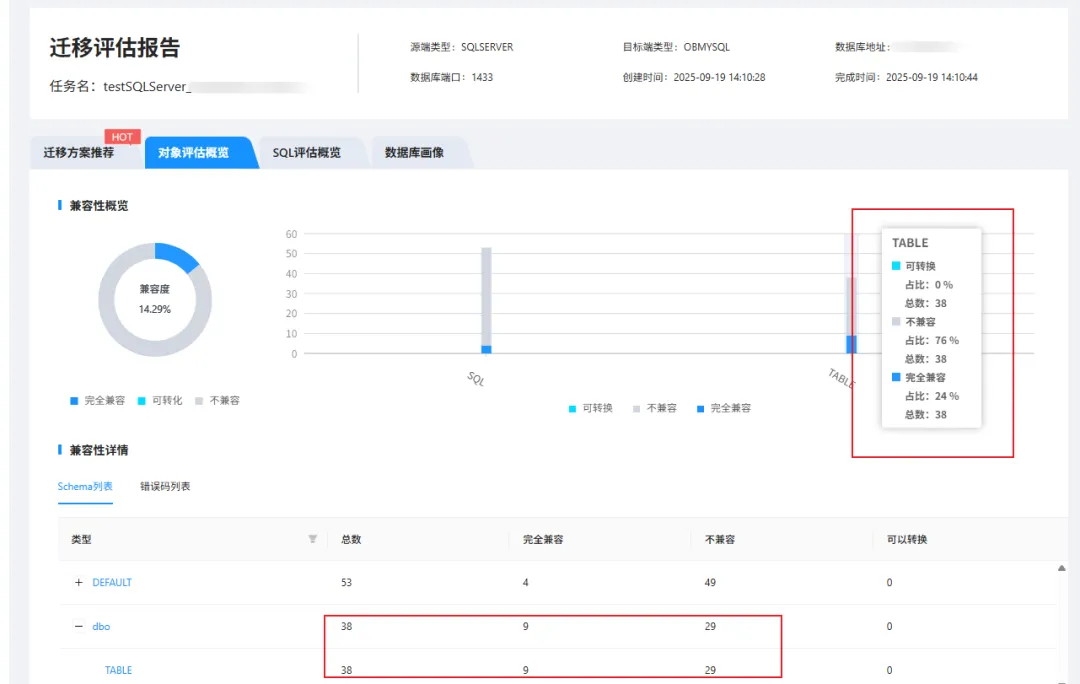
2) Data and Schema Migration (Action OMS)
Create a SQL Server-to-OceanBase (MySQL mode) migration pipeline in Action OMS.
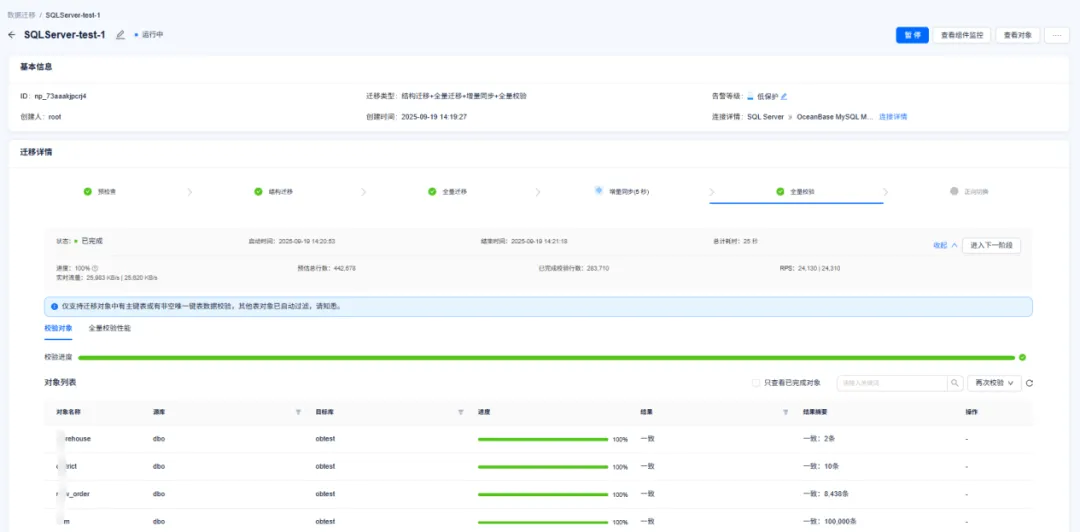 After the pipeline starts, you can compare table definitions before and after conversion and monitor key metrics in real time, such as full/incremental migration throughput (RPS) and sync latency.
3) Non-table Object Conversion (SQLShift)
- Export definition scripts for all non-table objects from SQL Server using tooling such as DBCAT.
- Sign in to SQLShift, upload scripts, launch intelligent conversion, and download converted SQL files.
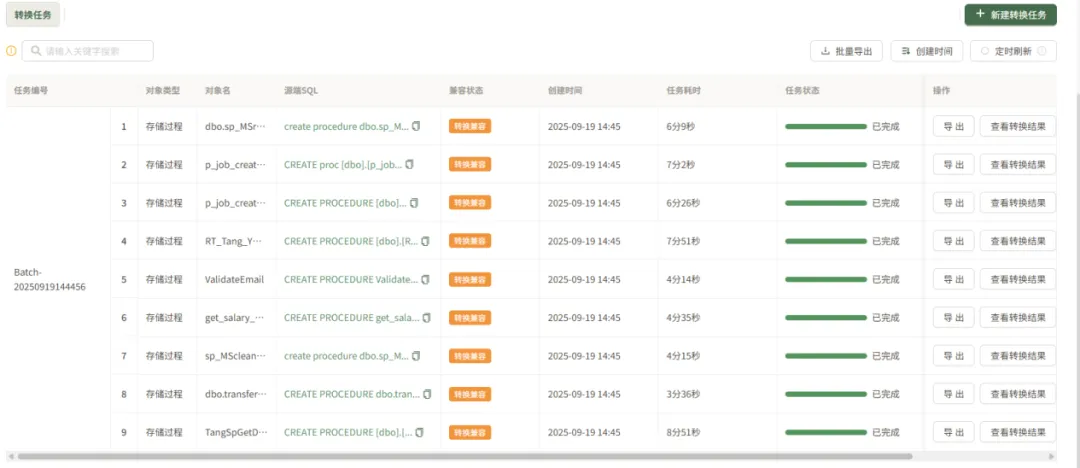
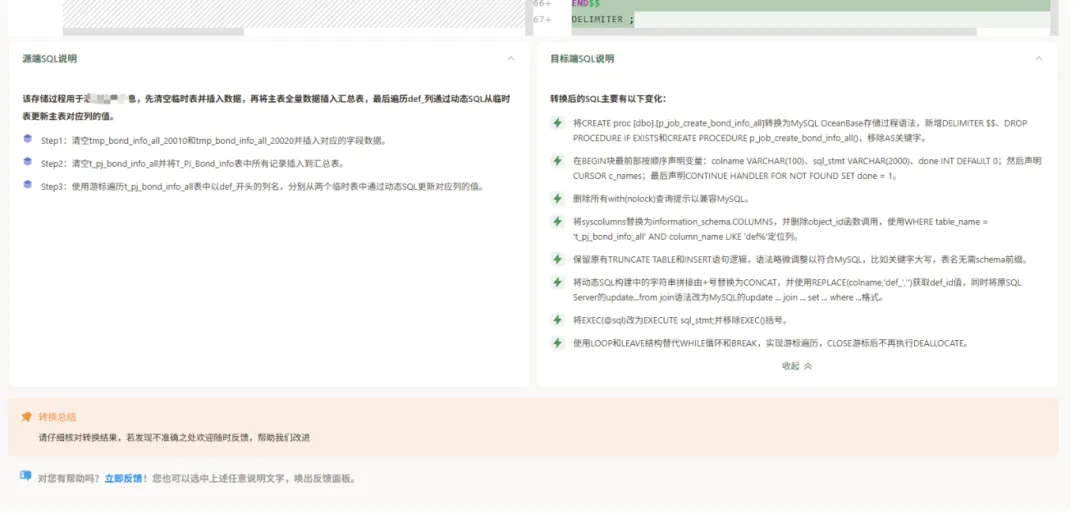
4) Data Consistency and Business Function Validation
Before formal cutover, initiate additional consistency checks in Action OMS as needed to ensure full synchronization between source and target. The business team can also connect to the target database for complete functional validation.
5) System Cutover and Reverse Synchronization
After successful validation, perform system cutover. At this stage, enable reverse incremental synchronization (OceanBase -> SQL Server) in Action OMS. This serves as a safety net: if performance or compatibility issues appear on the target side, services can be switched back immediately while reverse sync ensures seamless data backflow.
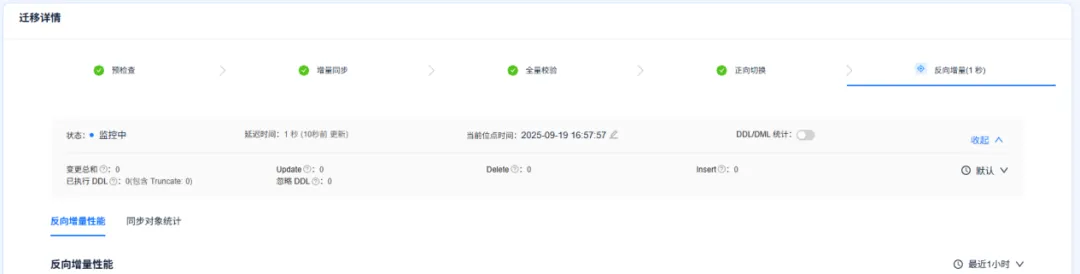
7. Migration Results
With ActionSky’s migration solution, the SQL Server database was successfully migrated to OceanBase (MySQL mode). Efficiency outcomes:
- Tables and data: 100% automated migration and synchronization.
- Stored procedures: over 85% automatic conversion success rate.
- Overall efficiency: manual refactoring workload reduced by 70%, and project timeline nearly halved.
The Action OMS + SQLShift combined solution accurately addresses the two core domains - table/data migration (ensured by Action OMS) and business logic migration (handled by SQLShift) - forming a complete closed-loop delivery process.
ActionSky makes SQL Server migration to OceanBase easier.
🎁 Limited-time Offer
The first 100 users can click here or follow the steps below to claim 30-day stored procedure conversion credits.
1. Click “Free Trial” in the top-right corner, then register and sign in to SQLShift.
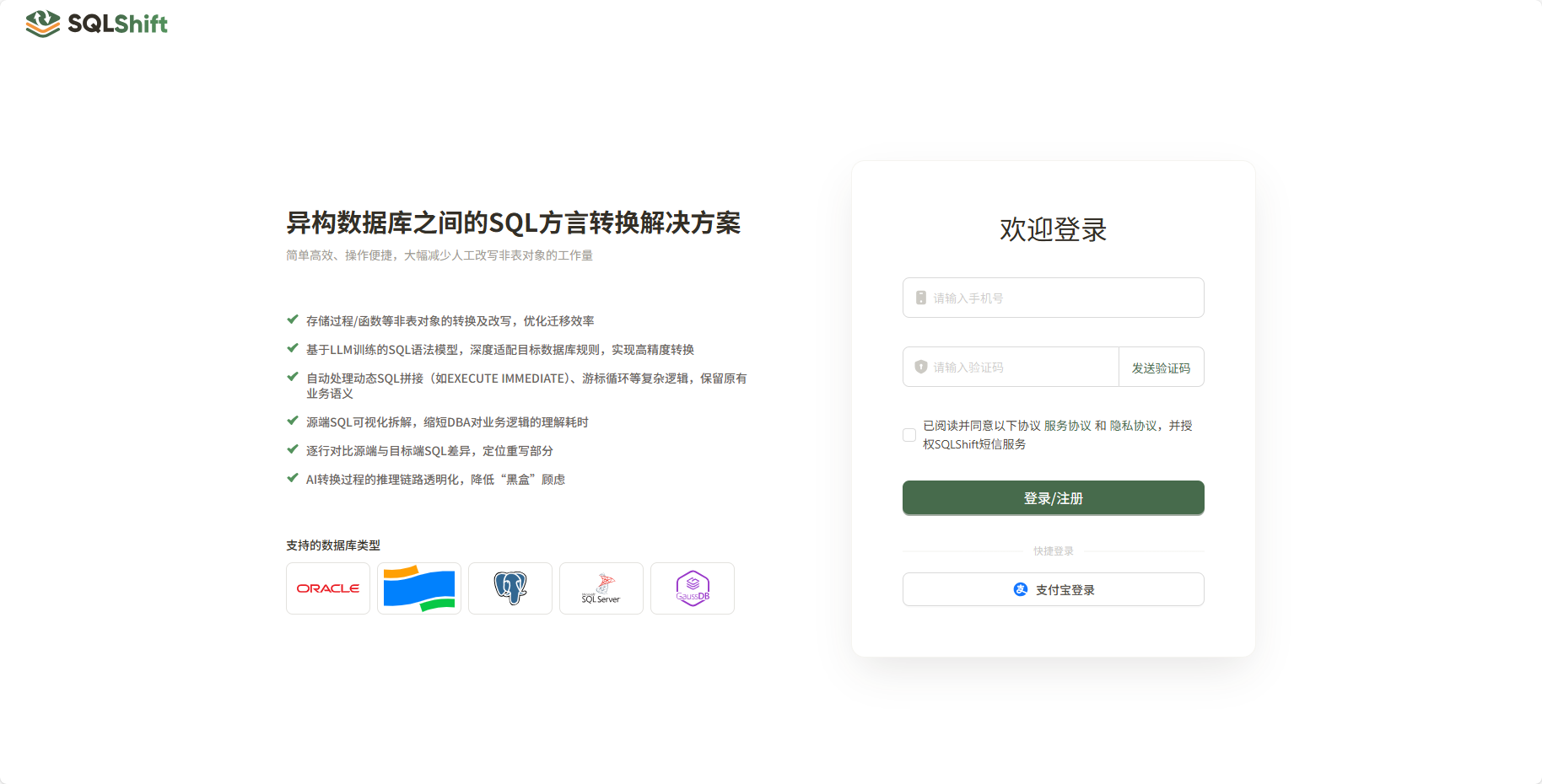
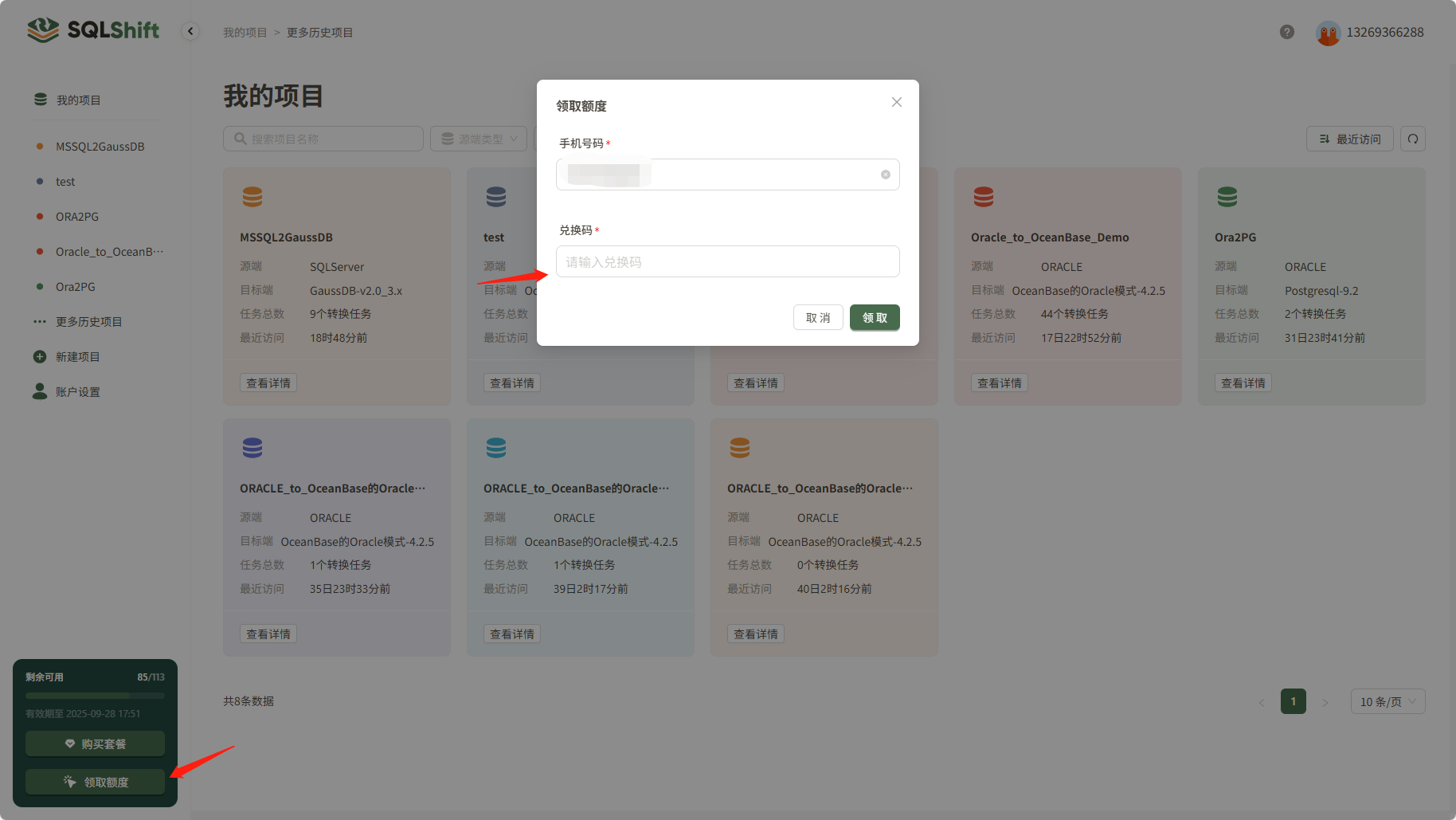
2. After signing in, click “Claim Credits” at the lower-left.
- Enter redemption code:
83103ce2-9167-439c-a03c-532c911fb516 - Successfully claim 10 credits, valid for 30 days.